

Azure DevOps pipeline
Read an Azure DevOps pipeline by stage, job and step, opening one level at a time.
Diagram · origin tag azure-devops/pipeline · Infrastructure, network & cloud diagrams
Availability
| Host | State | How to get it |
|---|---|---|
| Standalone | Prototype | Not yet released |
| Desktop | Prototype | Not yet released |
| IntelliJ Platform | Not planned | Not planned |
| Visual Studio Code | Not planned | Not planned |
| Eclipse | Not planned | Not planned |
| ThinkRail | Not planned | Not planned |
| Notion | Not planned | Not planned |
| Claude | Not planned | Not planned |
What it is for
Azure DevOps pipeline diagram, read at three levels: stages, the jobs inside an opened stage, and the steps inside an opened job (one element per step in declared order, no edges - steps are a sequence and not a graph). Opening either level is a menu entry on the element; there is no keyboard path for expansion at either level. Both levels push add and remove deltas rather than the `Group`/`Ungroup` actions the archived requirement named, deliberately and for the reasoning at `PipelineElementMapper.cs:87`; a change there would cover both levels at once
Why a specialized view helps
Pipeline YAML nests stages, jobs and steps inside templates; drilling down one level at a time keeps a long pipeline readable.
File formats
Not described yet.
Screenshots
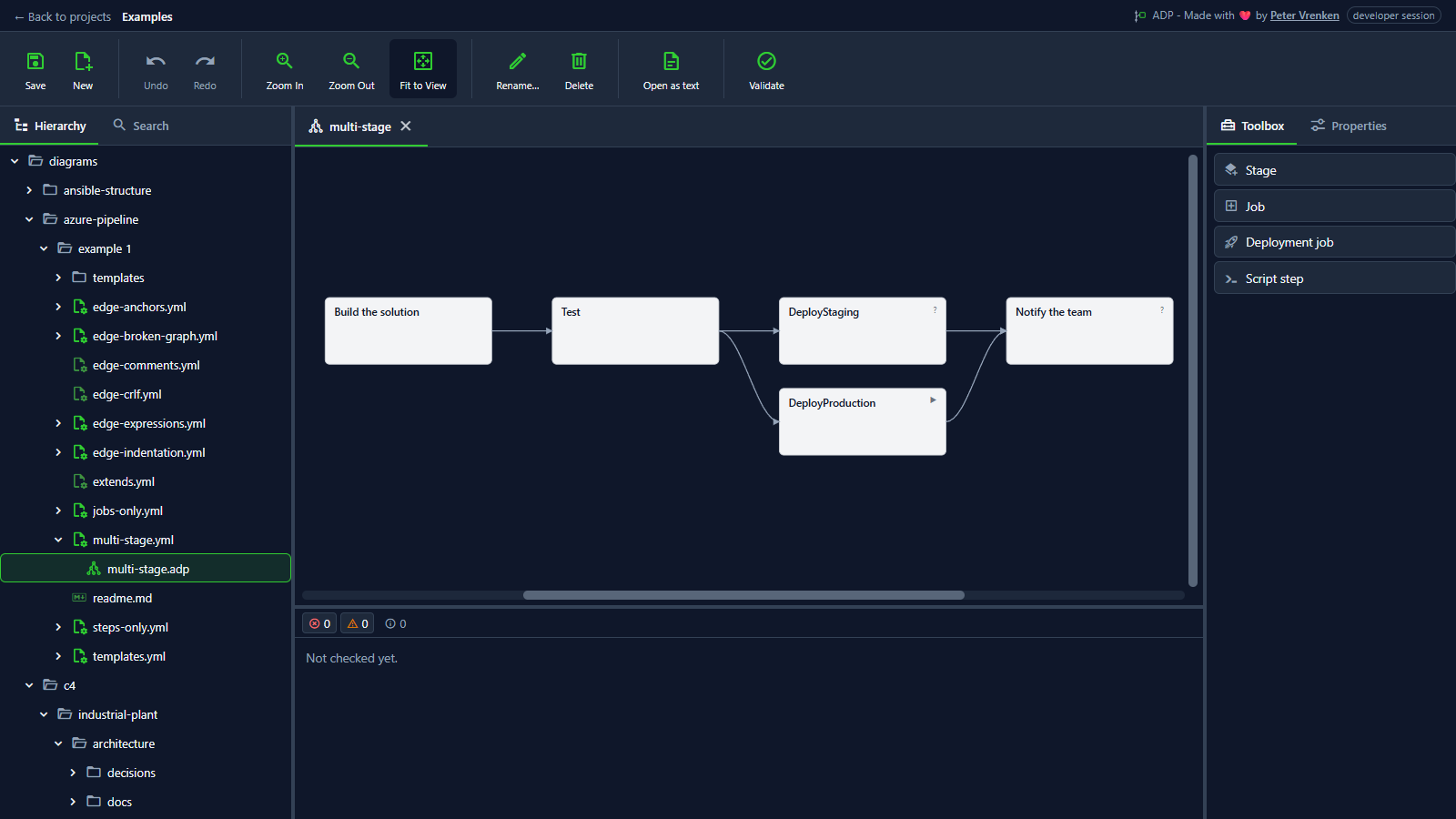
Standalone, at a8616b3
What is visible: The stage graph left-to-right with its dependency edges. Nothing selected.
Why it matters: The whole pipeline reads left to right as stages and the dependencies between them, so the order of a run and where it fans out, here to staging and production, is clear without reading the YAML.
Licence: Apache-2.0
Background
Focus areas
Sources
etalii-adp/etalii.adp.ide.standalone@9b232f0docs/tools.md, licence Apache-2.0etalii-adp/etalii.adp.ide.intellij@dc9c697docs/tools.md, licence Apache-2.0etalii-adp/etalii.adp.ide.vscode@ab93d8fdocs/tools.md, licence Apache-2.0etalii-adp/etalii.adp.ide.standalone@a8616b3docs/screenshots/azure-pipeline.png, licence Apache-2.0- Notion, edited (page
3e7be2fd-05b6-817d-bd7d-d52bd3684e4f), licence Apache-2.0
