

Agent activity diagram
Aims to give developers one overview of where work happens: which agent works on which specification, on which branch, folder and machine.
Diagram · origin tag etalii/agent-activity-diagram · Business process & workflow notation
Availability
| Host | State | How to get it |
|---|---|---|
| Standalone | In progress | In progress |
| Desktop | In progress | In progress |
| IntelliJ Platform | Not planned | Not planned |
| Visual Studio Code | Prototype | Not yet released |
| Eclipse | Not planned | Not planned |
| ThinkRail | Not planned | Not planned |
| Notion | Not planned | Not planned |
| Claude | Not planned | Not planned |
What it is for
An agent activity diagram gives developers one picture of where what work is happening: which agents work on which specification of which project, on which branch and in which folder, and on what system. It has five element types: projects in the middle, then their specifications with their tasks listed by status, the agents working on them, the locations they work in (a branch and a folder, with the pull requests opened from it), and the environments those locations run on, such as a local machine, a cloud environment, a container or WSL. Four relations connect them, and nothing else: a project to its specifications, a specification to its agents, an agent to its locations and a location to its environment. Agents keep it current by editing one plain YAML file, `.aad`, as they work; a person reads it as a picture, locks what they place, folds away groups they do not need and shows or hides archived specifications. That view is kept in the same file, and agents leave it alone. An open diagram follows the file as agents change it.
Why a specialized view helps
Work spread over agents, branches, worktrees and machines is invisible in any one of them; a dedicated diagram that agents keep current, with fixed rules for what connects to what, makes it one picture.
File formats
| Extension | Format | Reads | Writes |
|---|---|---|---|
.aad | .aad | Yes | Yes |
Screenshots
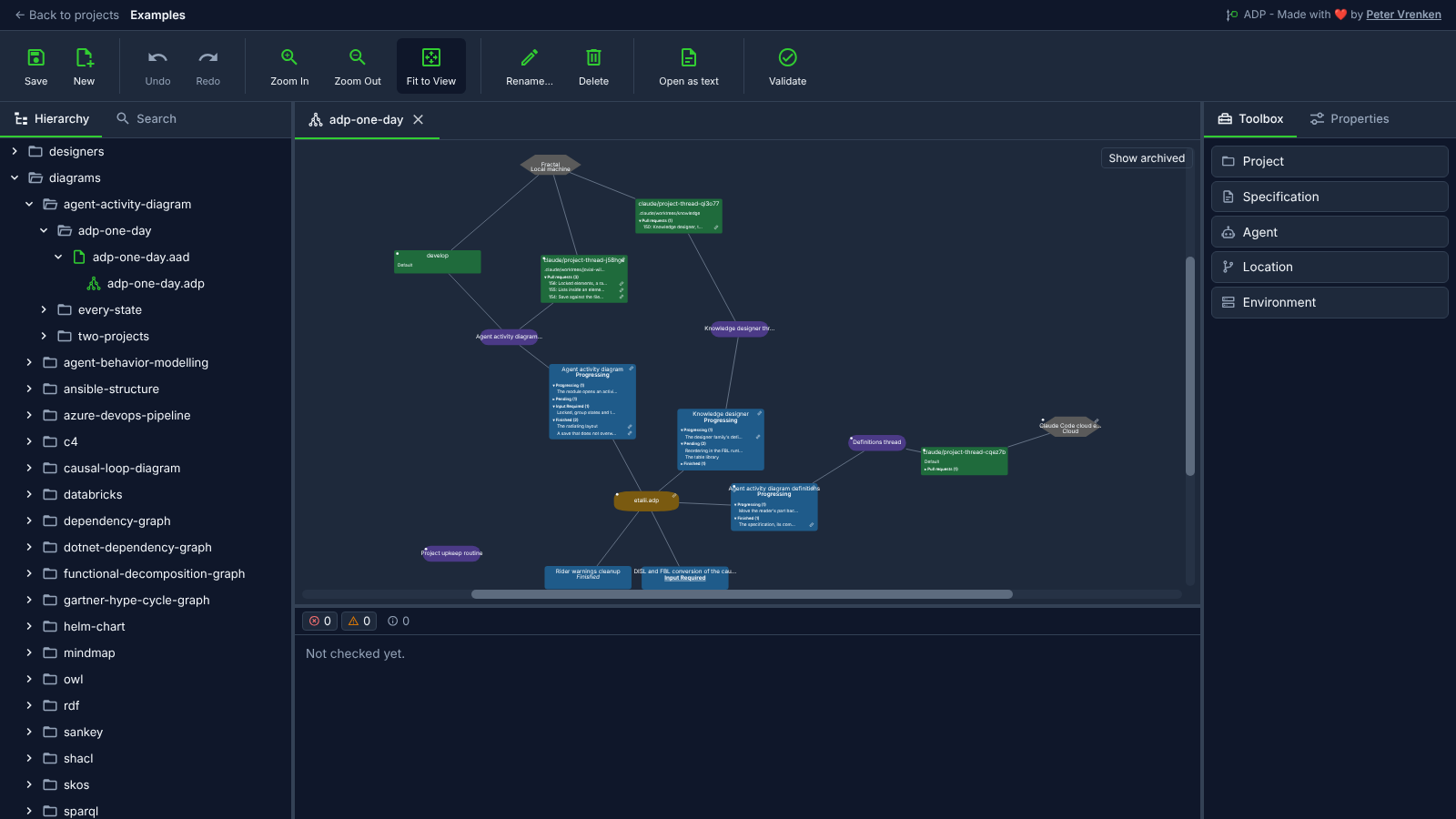
Standalone, at 5ac81b3
What is visible: One day of ADP work: the projects in the middle, their specifications around them with tasks listed by status, the agents, the locations with their branches and pull requests, and the environments at the rim, with the Show archived toggle at the top right; Toolbox showing Project, Specification, Agent, Location and Environment. Nothing selected.
Why it matters: One picture shows which agents work on which specification of which project, where and on what system: projects in the middle, their specifications with tasks by status around them, then agents, branches with their pull requests, and environments, so a day of human and agent work reads at a glance.
Licence: Apache-2.0
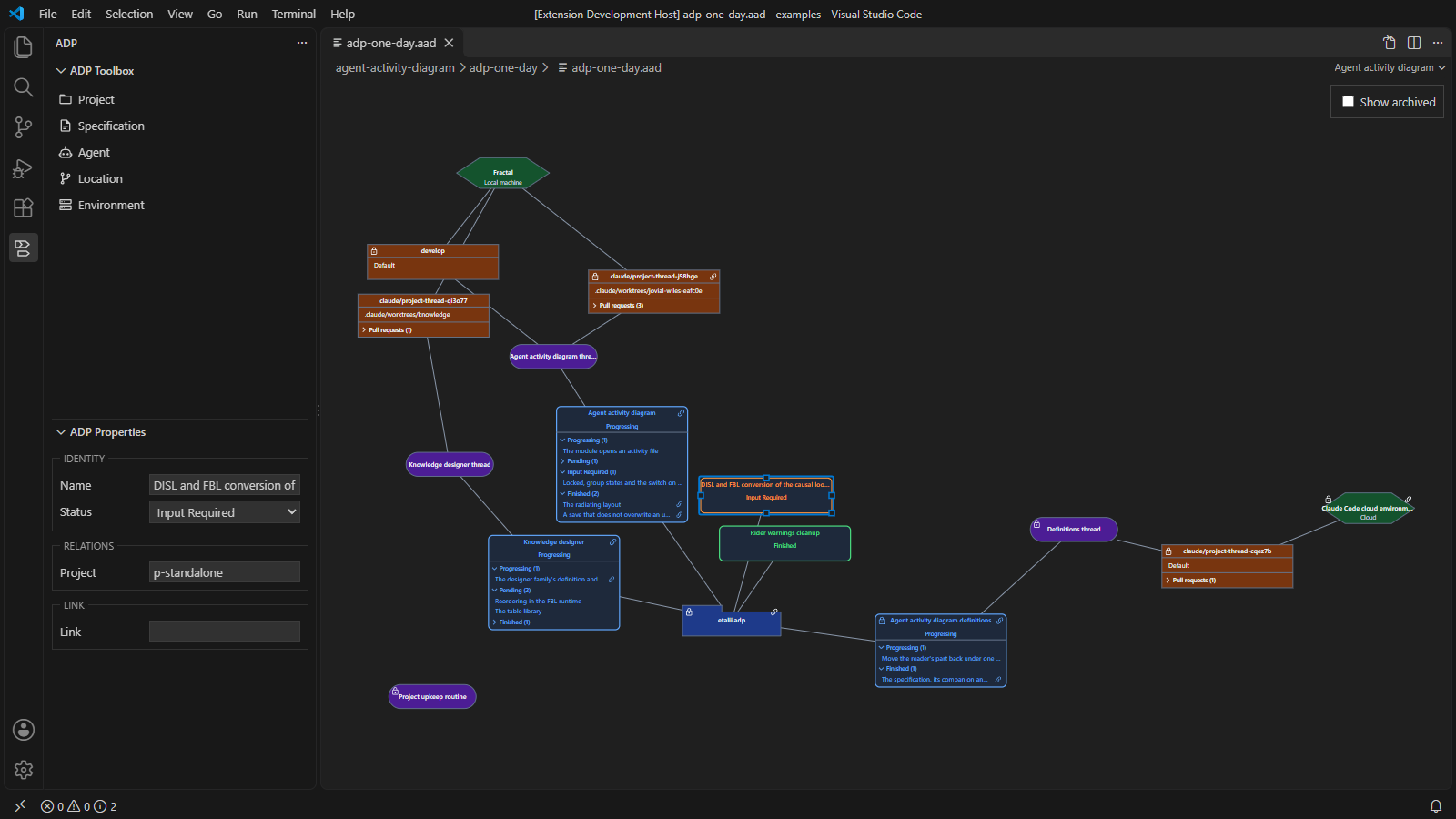
Visual Studio Code, at 683d9b0
What is visible: ADP on one day: the projects, specifications with their task groups, agents, locations and environments, each in the shape and colour of its kind, with the Show archived switch; ADP Toolbox listing Project, Specification, Agent, Location and Environment; the element nearest the middle selected, with its properties in ADP Properties.
Why it matters: A day of ADP opens inside VS Code as projects, specifications, agents, locations and environments, each in the shape and colour of its kind, with the selected element's properties in ADP Properties, so who works on what can be read beside the files the agents change.
Licence: Apache-2.0
Background
Focus areas
Sources
etalii-adp/etalii.adp.ide.standalone@9b232f0docs/tools.md, licence Apache-2.0etalii-adp/etalii.adp.ide.intellij@dc9c697docs/tools.md, licence Apache-2.0etalii-adp/etalii.adp.ide.vscode@ab93d8fdocs/tools.md, licence Apache-2.0etalii-adp/etalii.adp.ide.standalone@5ac81b3docs/screenshots/agent-activity-diagram.png, licence Apache-2.0etalii-adp/etalii.adp.ide.vscode@683d9b0docs/screenshots/agent-activity-diagram.png, licence Apache-2.0- Notion, edited (page
3f4be2fd-05b6-815e-a485-ea1ab96e24df), licence Apache-2.0

