

Hierarchical Requirement Designer
Read and edit the requirements of a subject by its structure, as nested boxes, in a Markdown file an agent writes too.
Designer · origin tag etalii/hierarchical-requirement · Designers
Availability
| Host | State | How to get it |
|---|---|---|
| Standalone | Prototype | Not yet released |
| Desktop | Prototype | Not yet released |
| IntelliJ Platform | Not planned | Not planned |
| Visual Studio Code | Prototype | Not yet released |
| Eclipse | Not planned | Not planned |
| ThinkRail | Not planned | Not planned |
| Notion | Not planned | Not planned |
| Claude | Not planned | Not planned |
What it is for
The requirements of one subject on one page of nested boxes, following the subject's structure: items hold requirements and further items, and every entry is numbered, tagged, given categories and a state. Questions, remarks, warnings and ideas are attached to an item or a requirement as assessments. A person collapses levels, focuses on a deep item with a trail back to the top, and filters and sorts the page; an agent reads and writes the same Markdown file as text, recognised by the envelope on its first line, and the designer follows each change the agent makes.
Why a specialized view helps
Requirements kept with agents are usually flat, per-feature Markdown that a person can only skim and search, and nothing shows how they fit together. Laying them out by the structure of the subject, with numbers, references and assessments to discuss them by, gives the person and the agent one place to work on them, while the file stays plain Markdown the agent edits as text.
File formats
| Extension | Format | Reads | Writes |
|---|---|---|---|
.md | .md | Yes | Yes |
Screenshots
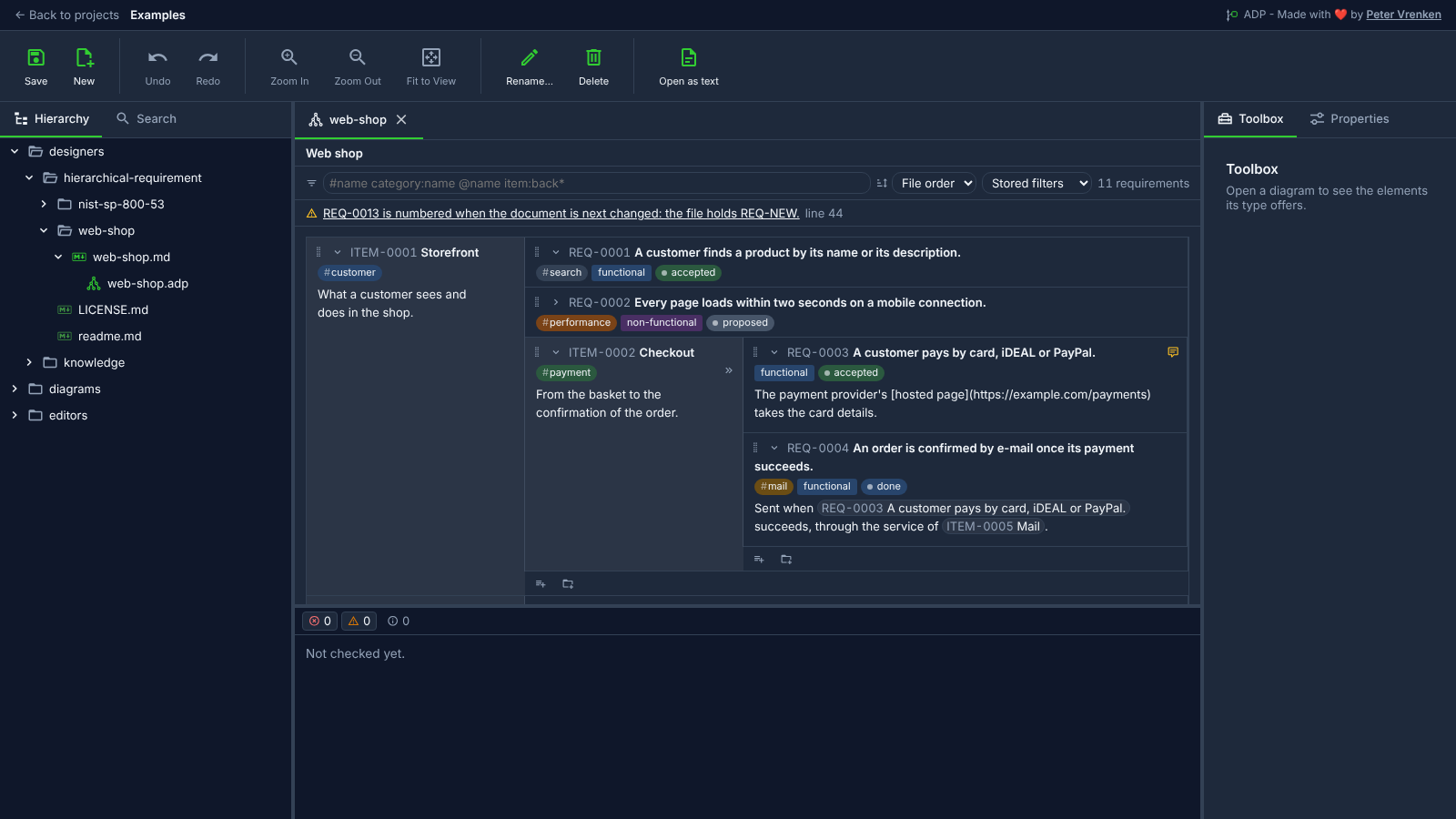
Standalone, at d0b83ed
What is visible: The Hierarchical Requirement Designer's page of the web shop, from the small example (never the NIST one): the filter bar, the finding about `REQ-NEW` above the page, the item *Storefront* as a box on the left with its requirements to its right and *Checkout* nested in it with the mark of its hidden level (the next item, *Backend*, starts just below the fold); numbers beside the titles, tags with their `#`, categories as badges and states with a dot, *REQ-0002* collapsed, the note icons of the open assessments, and the add icons at the end of each level. Not fitted: the page has no canvas. Nothing selected, and no box under the pointer, so no box shows its hover controls.
Why it matters: The web shop's requirements follow its structure: Storefront holds its requirements and the nested Checkout, each numbered, tagged, categorised and given a state, so a person sees how they fit together in a Markdown file an agent writes as plain text, and the finding above the page says what the next save will number.
Licence: Apache-2.0
Background
- A tool defined by the user of this repository, so ADP owns the format and the etalii/ origin; specified in etalii-adp/etalii.adp (specs 028 and 029)
- etalii.adp
Focus areas
Sources
etalii-adp/etalii.adp.ide.standalone@9b232f0docs/tools.md, licence Apache-2.0etalii-adp/etalii.adp.ide.intellij@dc9c697docs/tools.md, licence Apache-2.0etalii-adp/etalii.adp.ide.vscode@ab93d8fdocs/tools.md, licence Apache-2.0etalii-adp/etalii.adp.ide.standalone@d0b83eddocs/screenshots/hierarchical-requirement.png, licence Apache-2.0etalii-adp/etalii.adp.ide.vscode@96e207cdocs/screenshots/hierarchical-requirement.png, licence Apache-2.0- Notion, edited (page
403be2fd-05b6-819f-9743-e2c9e62f2b3d), licence Apache-2.0

